Guitar amp + effects for Windows · standalone app + VST3 plugin
The guitar tones from your favorite songs, ready to play.
Describe the sound you’re after — in plain English, or out loud — and ToneGenie builds the whole rig and plays it live: amp, cabinet, pedals and all. Then take the exact same sound into your DAW with the included VST3 plugin.
Windows 10/11 · one-time purchase · no subscription · no account
Example: typing “warm blackface-style clean with a slow tremolo and a touch of plate” builds the chain Amp Clean, Cab US Clean 2×12, Mod Tremolo, Verb Plate. The demo types four such requests in turn — the others are “the tone from the intro of My Own Summer”, “shoegaze wash — big fuzz into shimmer” and “spanky funk clean with an envelope filter” — lighting up each block of the chain as it goes.
Type it or say it. Small changes — “a bit less reverb”, “add more gain” — apply instantly, mid-note.
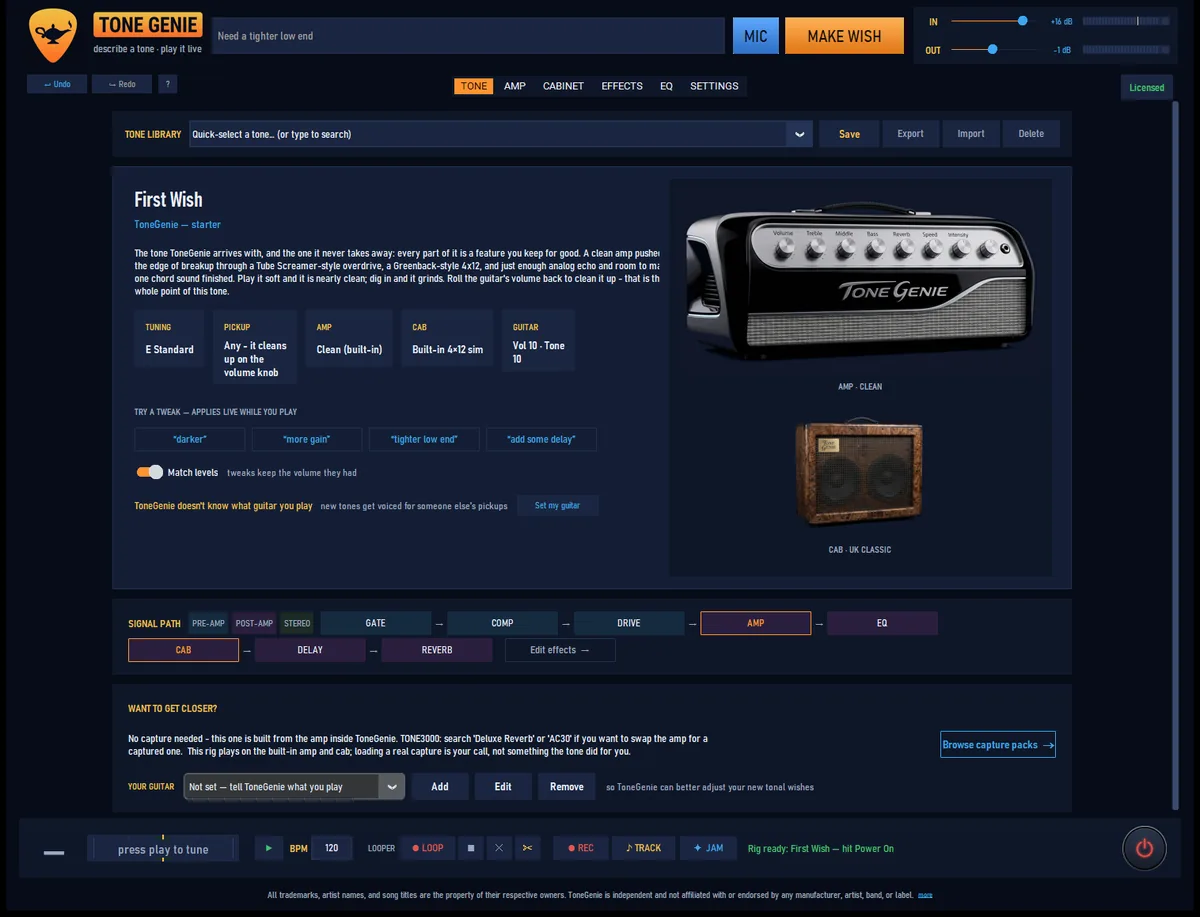
One product, two halves
Design it in the app. Play it in your DAW.
ToneGenie ships as a pair: a standalone app that designs tones, and a VST3 plugin that plays them while you record. They run the same audio engine.
The tone workshop
Where sounds are made — and where you practice.
- Describe a tone by text or voice, then play it live through your interface
- Full amp, cab and pedalboard control — every knob live while you play
- Tuner, looper, metronome, jam tracks, recorder, visualizer
- Works with any output — onboard sound to ASIO interfaces
The recording rig
The same sounds, inside your DAW.
- Every preset you design travels both ways, app ↔ plugin
- Every knob is host-automatable
- Reports its true latency so your DAW keeps tracks aligned
- Passes pluginval at maximum strictness — zero failures
How it works
Say it. Hear it. Keep it.
Describe it
A song, an era, a genre, a piece of gear — whatever words you’d use to a friend. Type it or just say it out loud.
Make wish
ToneGenie builds the rig — amp voice, cabinet, pedals, effect order, settings — and starts playing it immediately. Nudge anything by hand or by voice.
Play & record
Practice live in the app, or load the preset in the plugin and track it. The recorder keeps a clean DI of every take, so you can re-amp later.
No subscription, no middleman. AI tone design runs on your own key from any of five providers — you pay the provider directly, and ToneGenie takes nothing. Google’s has a free tier, so you can design tones without paying anyone at all. Don’t want a key? The built-in offline parser still understands effects and styles, and every knob is yours to turn.
Amps & cabinets
Five voices, built from the circuits up
Plus every amp the internet has captured.
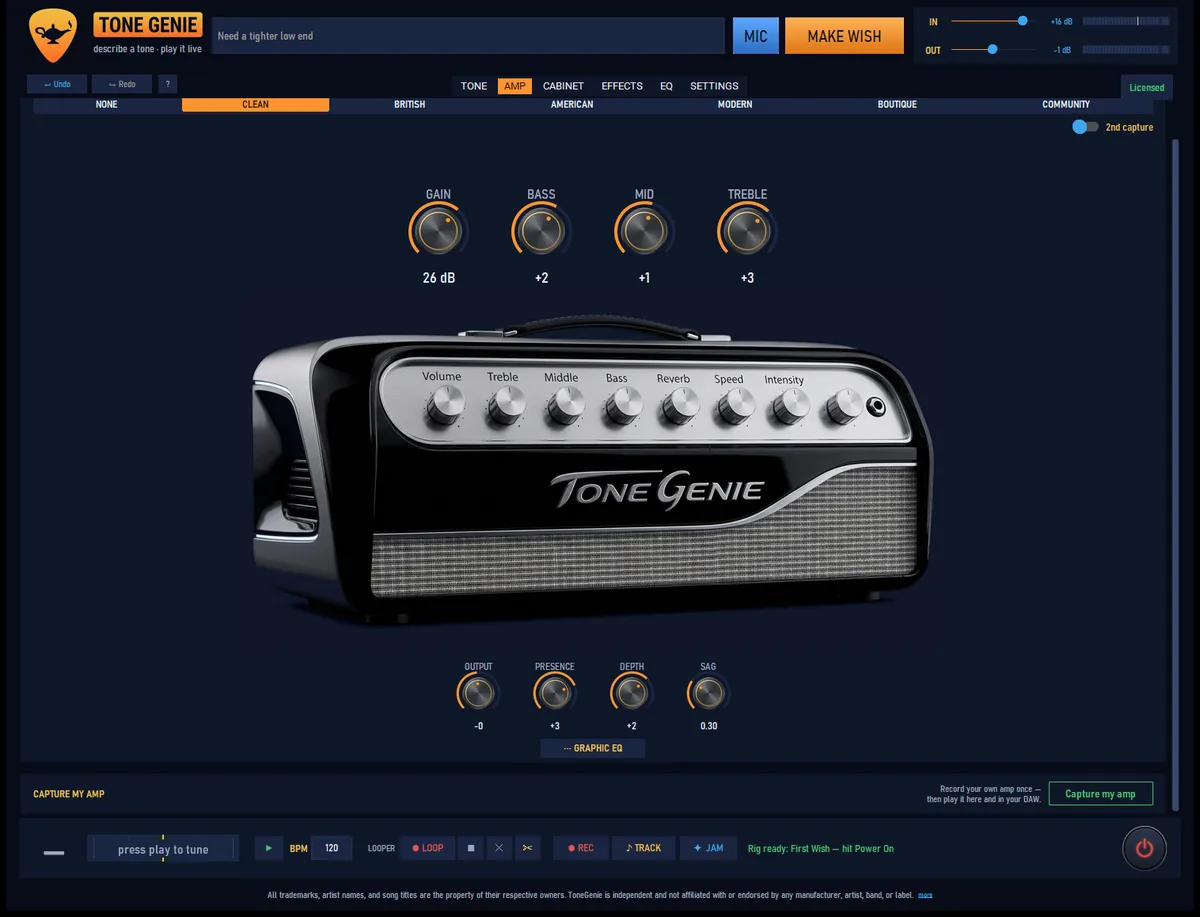
Circuit-voiced, not sampled
Each built-in voice is voiced from real circuit behavior, with tone stacks verified component for component against published schematics of the classics. That’s why the knobs behave like an amp’s: continuous, interacting, live while you play.
- CleanBlackface-style sparkle and headroom
- BritishClassic-stack crunch and bark
- AmericanWarm break-up with spring in its step
- ModernTight, saturated high-gain
- BoutiqueTouch-sensitive D-style smoothness
Or load a capture of the real thing
ToneGenie plays NAM (Neural Amp Modeler) captures — free, community-made recordings of real amplifiers — as your amp. Browse and download thousands of them without leaving the app, run two at once and blend, and even use captures as drive pedals — up to three stacked.
Cabinets, mic’d your way
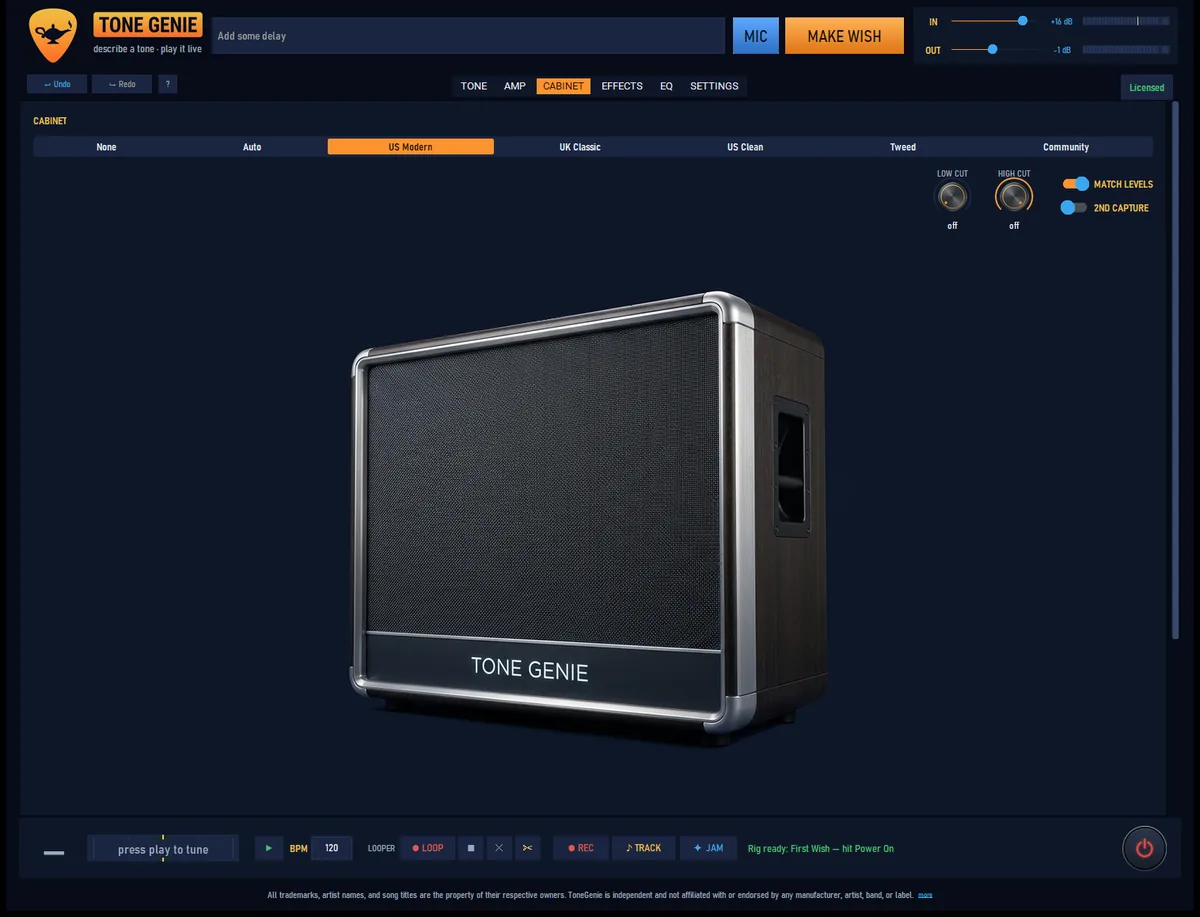
Four bundled cabinet IRs plus any WAV impulse response you import. Blend two cabs, place up to two studio mics (five classic mic models) on a draggable top-down speaker view, add one of seven room ambiences, and finish with a cab channel strip — low cut, high cut, phase, level.
Effects
A pedalboard with more than 65 effects
Drag them into any order. 132 one-click flavors across the board mean a good starting point is never more than one click away.
Drive
- Boost 2 models
- Overdrive & Fuzz 8 models
- Capture Pedal stack up to 3
- Octave Fuzz
Modulation
- Chorus 6 models
- Dimensional
- Flanger
- Phaser
- Vibe
- Rotary
- Tremolo
- Vibrato
- Auto-Pan
- Ring Mod
- Slicer
Time & space
- Delay 7 modes · tap · sync
- Reverb 5 modes + shimmer
- Spring Reverb
- Pre-Verb
- Swell
Pitch & voice
- Pitch Shift 6 modes
- Octave
- Harmony
- Smart Harmony in-key
- Harmonizer multi-voice
- Drop Tune
- Detune
- Doubler
Texture
- Phonograph
- Lo-Fi
- Granular
- Freeze
- Talk Box
- Acoustic Sim 4 modes
- Guitar Synth
Dynamics & tone shaping
- Noise Gate
- Compressor
- Multiband Comp
- Wah 4 voicings
- Auto-Wah
- 9-Band EQ
- Parametric EQ
- Hum Filter
- Stereo Width
Dimensional
A true-stereo spatial chorus, built from the published schematic of a mid-’80s two-chip studio dimension unit. Anti-phase modulation on opposite sides means it reads as width, not warble — and folds back to mono cleanly.
Phonograph
One knob crossfades a squishy compressor into a warped, wobbling “ruined record” vibrato, in the style of a cult lo-fi pedal. Six flavors, from Warped 45 to Haunted Room.
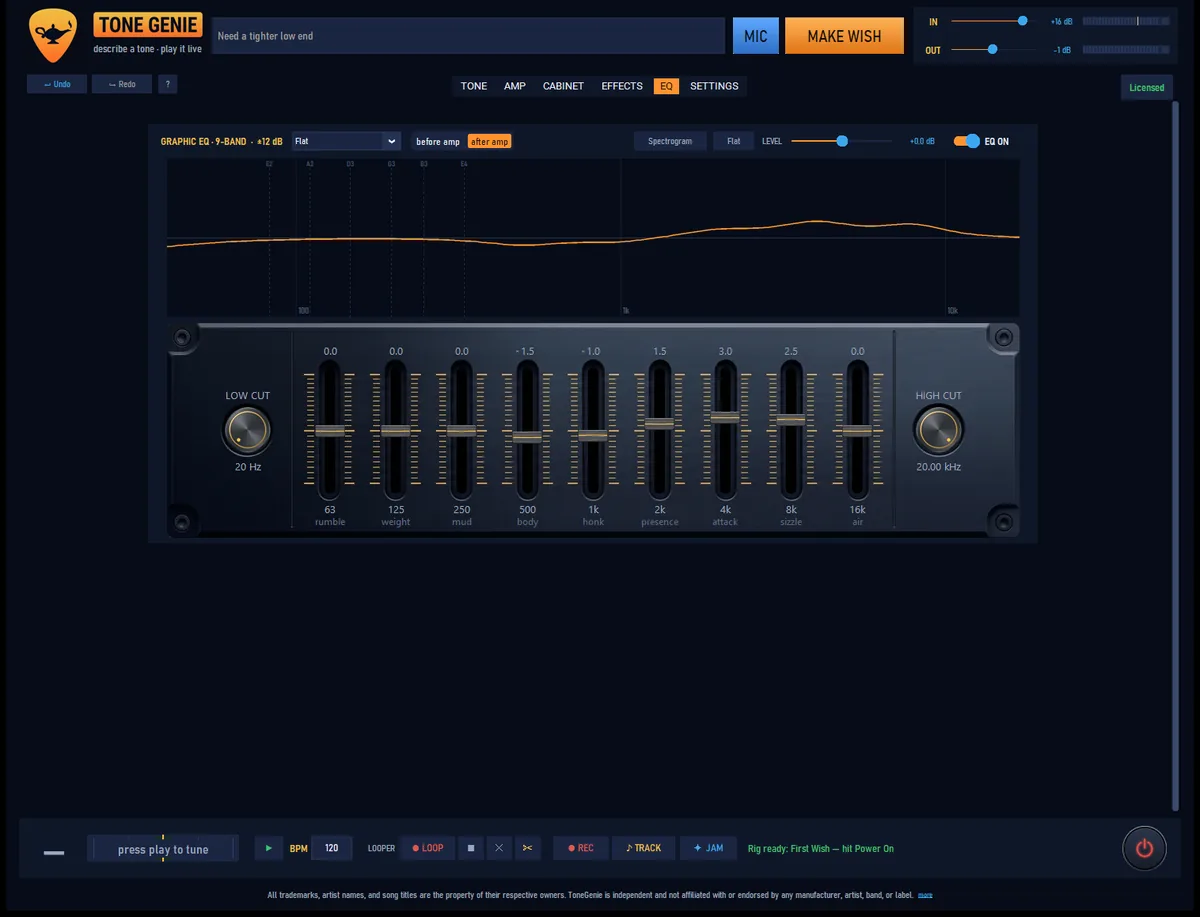
EQ
See your sound while you shape it.
A 9-band graphic EQ with a live spectrum analyzer running behind a measured response curve — drag the curve itself, or the faders. Place it before or after the amp. It measures dead-on: ask a band for +6.0 dB and that’s exactly what you get.
The practice room
Everything around the tone, too
Jam tracks
223 jam tracks across a dozen-plus genres, filterable by genre, key and tuning, with A–B looping and settable start points.
Looper
Record, overdub and trim up to 90 seconds of your fully processed sound, with a live waveform view.
Tuner
Chromatic, with 45 tunings across 6-, 7- and 8-string guitars — down into drop-tuned 8-string territory.
Recorder + DI
Every take is saved with a bit-identical dry DI track alongside it, so you can re-amp any performance later.
Metronome
Tap tempo, time signatures from 2/4 to 7/8, subdivisions, accented downbeats — locked to your monitoring, never printed to your recording.
Jam view
A fullscreen visualizer driven by what you play — note pitch drives the color — with 16 built-in scenes and classic music-visualizer presets.
Setlists & snapshots
Order your tones for a session or a gig and step through hands-free. Rig changes are gapless — delay and reverb tails ring out under the new sound.
MIDI control
Map an expression pedal to wah, volume or gain with sweep calibration; a footswitch taps the looper; program changes step your setlist.
Audition
No guitar in hand? ToneGenie plays a short performance through the current rig so you can hear any tone, anywhere.
The VST3 plugin
Built to be trusted in a session
In your DAW
- Windows x64 VST3, validated across sample rates from 44.1 to 192 kHz
- Every parameter automatable, with numbering frozen so old sessions keep their automation lanes
- True latency reported to the host, so tracks stay sample-aligned
- Resizable editor with the same look and knob feel as the app
Held to a standard
- Passes pluginval at strictness 10 — the maximum — across all 25 test suites, zero failures
- Memory-clean under AddressSanitizer
- No memory allocation on the audio thread; denormal- and NaN/Inf-hardened across all 24 processing entry points
- Output level consistent within 0.14 dB across every supported sample rate
Engineering
Measured, not marketed
We won’t tell you it sounds amazing — that’s your call, and the trial is free. What we can show you is the engineering: every tonal decision in ToneGenie is verified by measurement, and the numbers below are from those measurements, not a brochure.
| Anti-aliasing | 8× oversampling around every nonlinearity — cascaded half-band filters with ≥78 dB stopband — plus first-order antiderivative anti-aliasing on the tube stages. Measured aliasing floor: −73.5 dB or better at maximum gain, on every voice. |
|---|---|
| App ↔ plugin parity | Both halves run the same native engine over the same rig format. Headless render match: within 1.5×10⁻⁸. A byte-level test enforces it on every build. |
| Tone stacks | Verified component for component against published schematics of the circuits they’re modeled on. |
| CPU | All processing is CPU-based DSP — no GPU needed. ≈0.1 ms of processing per audio block; even a worst-case parallel rig sits around half the real-time budget on a modern quad-core. |
| Latency | 43 samples through the amp path, reported honestly to the host; the app shows your real, negotiated round-trip latency in the status bar, live. |
| Stability | Automatic recovery from audio-device dropouts. |
| Updates | One-click updates are cryptographically signed (Ed25519) — the signature, not the server, is the root of trust. |
Pricing
Buy once. New features arrive free.
No subscription. No account. And when a trial ends, ToneGenie never goes silent on you.
Then it stays useful — free, forever:
- Your own amp captures keep playing at full quality
- Your own cabinet IRs, plus a bundled 4×12 cab
- A ten-pedal board: gate, comp, drive, wah, chorus, delay, reverb and more
- Capture pedals — still stackable, three deep
Everything, on every future version:
- Tone design by text or voice — describe a sound and hear it
- All five amp voices, all cabinets, mics and rooms
- More than 65 effects and all 132 flavors
- Looper, recorder, 223 jam tracks, jam view and the live spectrum analyzer
- Two captures at once, dual cabs, the full VST3 plugin
- New features and improvements, always free after you buy
Nothing to buy today — the button above puts you on the launch list instead.
About AI costs: tone design uses your own API key from any of five providers, and you pay that provider directly — ToneGenie adds nothing on top and runs no subscription. Google’s Gemini key has a free tier, so most players can design tones without paying anyone at all. Prefer no key? The offline parser and every manual control work without one.
FAQ
Fair questions
Do I need a subscription or an account?
Do I need an AI key to use it?
Does it work offline?
What do I need to run it?
Is there a Mac version?
Which plugin formats are supported?
What’s a NAM capture?
What happens when the trial ends?
Will updates break my DAW sessions?

Three wishes always seemed a bit stingy.
Ask for a sound.
14 days, everything unlocked, no card and no account. If it earns a place on your desktop, it’s one payment — ever.
Get the launch emailNot on sale quite yet. The launch email is a single message on launch day — nothing else, ever.